
Regex Generator
Regular expressions are powerful but hard to write from memory. This generator builds them for you: pick a common pattern such as an email address or a date, or describe what you want — starts with, ends with, allowed characters, length, must contain a digit — and it produces the regex, explains every piece, tests it against your text with highlighted matches, and gives you ready-to-paste code.
- Free to use
- No sign-up
- Runs in your browser
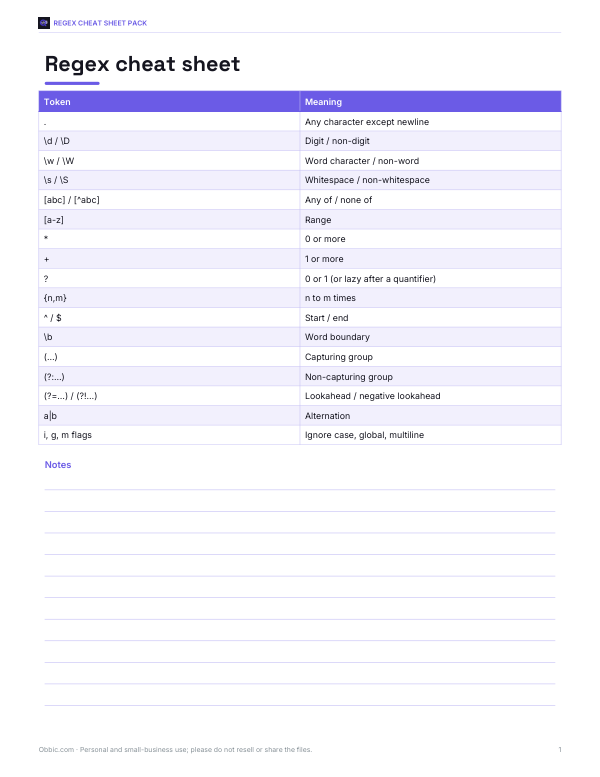
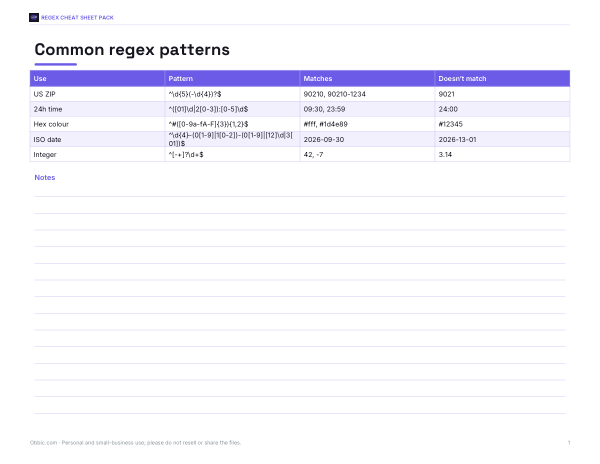
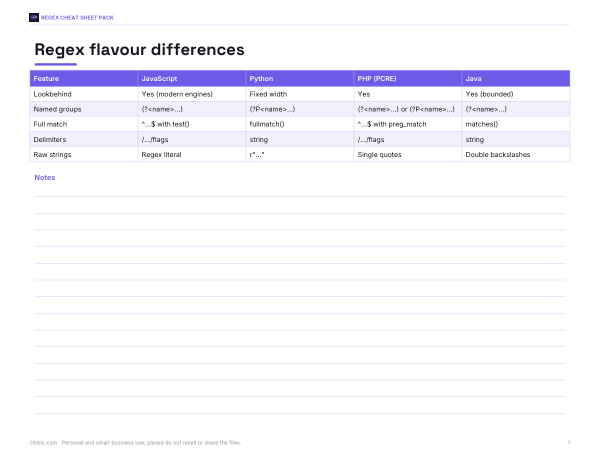
Regex generator and tester
Regex Cheat Sheet Pack
Printable regex cheat sheet, a common patterns reference with test cases and a flavour-differences table for JavaScript, Python, PHP and Java.
- Cheat sheet (PDF/XLSX)
- Common patterns (PDF/XLSX)
- Flavour table (PDF/XLSX)
Formats: PDF, XLSX. Instant download after payment (link valid 72 hours, up to 5 downloads). AI-assisted: the templates were drafted with AI help and reviewed and laid out before publishing.
$3.00 USD, one-time 3 files · about $1.00 each
- Instant download
- 7-day refund
- Secure checkout by Stripe
7-day money-back guarantee. Full refund within 7 days of purchase, even after you download.
Full refund within 7 days — see the refund policy and license.
Free printables
Single sheets you can print right now, no sign-up. The full pack adds every sheet in one download plus the editable files.
Regex building blocks
| Token | Meaning | Example |
|---|---|---|
| . | Any character except a line break | a.c matches abc, a-c |
| \d \w \s | Digit, word character (letter, digit, _), whitespace | \d{3} matches 123 |
| [abc] [^abc] | Any one of / none of the characters | [aeiou] matches a vowel |
| * + ? | 0 or more, 1 or more, 0 or 1 | colou?r matches color and colour |
| {n,m} | Between n and m times | \d{2,4} |
| ^ $ | Start and end of the input (or line with the m flag) | ^\d+$ — digits only |
| ( ) (?: ) | Capturing / non-capturing group | (\d{4})-(\d{2}) |
| | | Either / or | cat|dog |
| (?= ) | Lookahead: must be followed by | (?=.*\d) — contains a digit |
| \ | Escape a special character | \. matches a literal dot |
Using the generator
- Choose a ready-made pattern, or Custom rules to describe your own.
- Choose whole-input matching for validating a form field, or find mode for searching text.
- For custom rules, set start and end text, allowed characters, length and required character types.
- Read the explanation of each part.
- Paste test text — one value per line in validation mode — and check the matches.
- Copy the regex or the code snippet for your language.
Worked example: a password rule
The default custom rules build a password check: 8–20 letters and digits including at least one uppercase letter, one lowercase letter and one digit. The regex is ^(?=.*[A-Z])(?=.*[a-z])(?=.*\d)[A-Za-z0-9]{8,20}$. Each (?=…) lookahead checks a requirement without consuming characters, and the final part enforces the allowed characters and length. In the test box, “Passw0rd2026” and “UPPERlower99” match; “weakpass” fails (no uppercase or digit) and “Sh0rt” fails (too short).
Validation tips
- Regex checks format, not truth — a valid-looking email address may not exist, and a date like 2026-02-31 passes a simple pattern.
- Anchor validation patterns with ^ and $ so extra characters aren’t allowed.
- Prefer permissive patterns for names and addresses; real-world data is messy.
- For complex formats (full email grammar, international phone numbers), use a dedicated library.
- Always validate on the server too, not just in the browser.
Common regex tasks
| Task | Pattern idea |
|---|---|
| Trim whitespace | ^\s+|\s+$ replaced with nothing |
| Collapse repeated spaces | \s{2,} replaced with a single space |
| Extract numbers | -?\d+(?:\.\d+)? |
| Find hashtags | #\w+ |
| Find duplicate words | \b(\w+)\s+\1\b |
| Remove HTML tags (simple cases) | <[^>]+> |
Search-and-replace tasks usually use find mode (no anchors) with the g flag so every match is replaced.
Capture groups
Parentheses capture part of a match for later use. In (\d{4})-(\d{2})-(\d{2}), group 1 is the year, 2 the month and 3 the day, so a replacement such as $3/$2/$1 (JavaScript) or \3/\2/\1 (Python) turns 2026-09-30 into 30/09/2026. Use (?: ) when you need grouping for repetition or alternation but don’t need to capture.
Flavours differ
JavaScript, Python, PHP (PCRE), Java and .NET share most syntax but differ in details: lookbehind support, named-group syntax, Unicode classes and flags. The patterns here use common syntax that works in all three languages in the code tab. In Python, use raw strings (r"…") so backslashes are passed through unchanged; in PHP, the pattern is wrapped in delimiters such as /…/.
Testing patterns well
Good tests include values that should match, values that should not, and edge cases: empty input, the shortest and longest allowed values, extra spaces, and characters from other languages. Keep a list of these examples next to the pattern in your code — they document what the pattern is meant to accept and catch mistakes when someone changes it later.
Avoiding slow patterns
Nested quantifiers such as (a+)+ or (.*)* can take a very long time on some inputs (“catastrophic backtracking”). Keep patterns specific, avoid overlapping alternatives, and test with long inputs. The tester here limits test text to 20,000 characters.
Privacy
Everything runs in your browser; your patterns and test text are not uploaded.
Regex cheat sheet pack
The optional pack includes a printable regex cheat sheet, a common patterns reference with test cases, and a flavour-differences table for JavaScript, Python, PHP and Java. The generator above is free.
AI-assisted content
This page and its pattern library were drafted with AI assistance and reviewed before publishing. Test patterns against your own data before relying on them.
Frequently asked questions
What is a regex?
A regular expression — a pattern for matching text.
What is a regex for an email address?
A practical one is [A-Za-z0-9._%+-]+@[A-Za-z0-9.-]+\.[A-Za-z]{2,}.
How do I require a digit in a password regex?
Add the lookahead (?=.*\d) at the start.
What do ^ and $ mean?
The start and end of the input — they make the whole value match.
Does the same regex work in Python and JavaScript?
Mostly; basic syntax is shared, but some features differ.
Is my text uploaded?
No, the tester runs in your browser.
What does the g flag do?
It finds all matches instead of stopping at the first.
Why use non-capturing groups?
They group parts of a pattern without storing the match, which is simpler and slightly faster.
Can regex validate any email address perfectly?
No — the full email standard is very complex; practical patterns catch most typing mistakes, and sending a confirmation email is the real test.
What is a lookahead?
A check that text ahead matches (or doesn’t) without including it in the match — useful for password rules.